

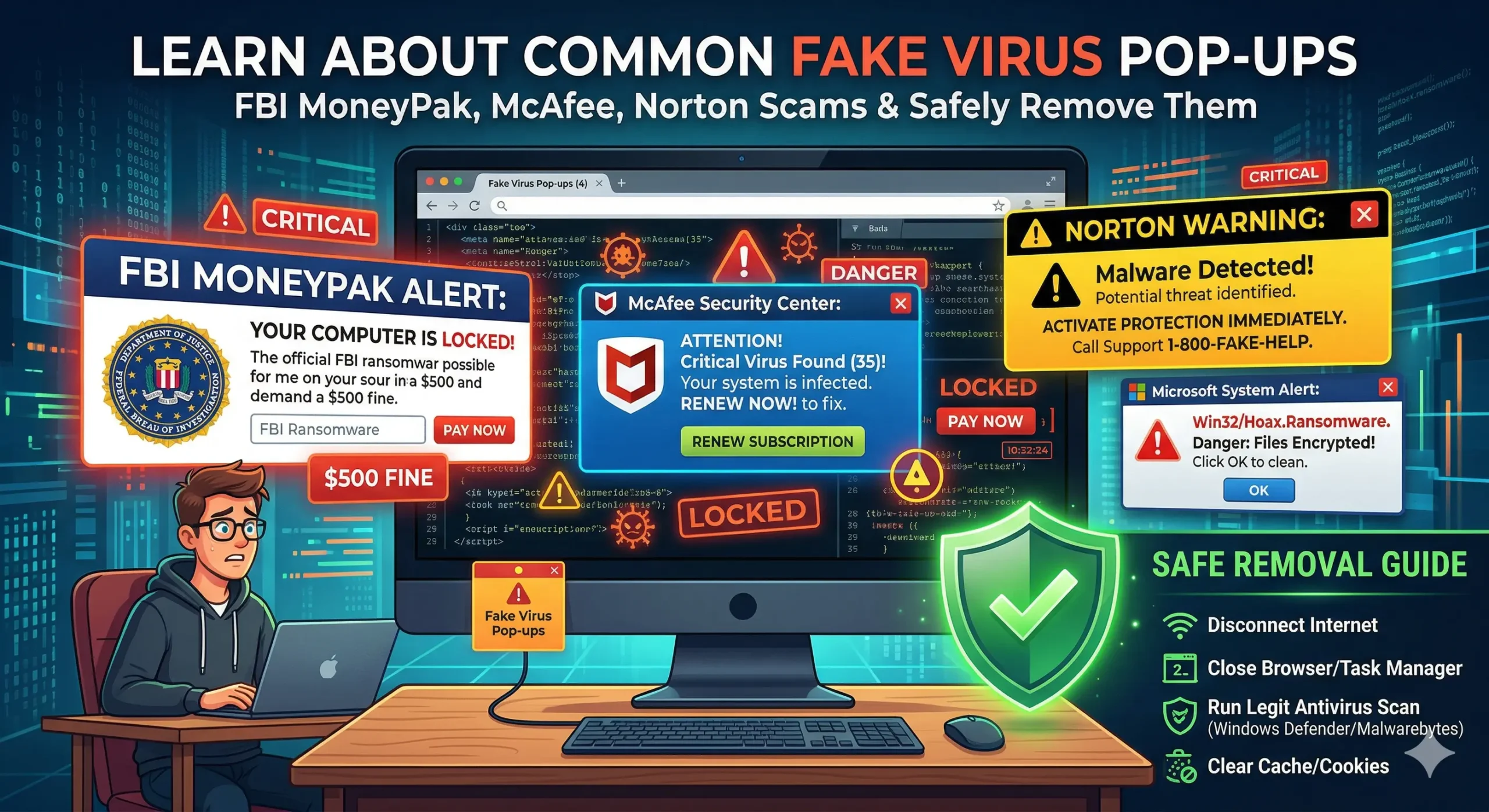
Expert Tip: Most “Critical Alerts” are browser hijacker scripts, not actual system infections.
How to Remove Fake FBI Virus Pop-Ups, McAfee & Norton Scams
Last updated: July 26, 2026
⚠️ Never call the phone number displayed in a fake virus pop-up.
Legitimate companies like Microsoft, McAfee, Norton, and the FBI do not lock your browser or demand payment through pop-up messages.
In 2026, cybercriminals have moved beyond simple ads. Today’s fake virus pop-ups use high-pressure tactics, AI-generated voice warnings, and full-screen browser locks to trick you into calling expensive “support” numbers.
In This Guide:
If you’re seeing a fake FBI virus pop up, a fake FBI warning, or another “Critical Infection” or “System Blocked” message, do not panic. These alerts are designed to scare you into calling fake support numbers or making unnecessary payments. Follow our safe removal methods below.
1. Fake FBI Virus Pop-Up & FBI Browser Lock Scams
A fake FBI virus pop up, sometimes called an FBI browser lock or FBI scam pop up, attempts to freeze your browser and falsely claims the FBI has detected illegal activity on your computer or IP address.
If you encounter an FBI virus pop up asking you to call a phone number or pay a fine, it is a scam. Legitimate law enforcement agencies do not lock web browsers or demand payment through pop-up messages.
- Fix: Do not pay the “fine.” Force-close your browser using Ctrl + Shift + Esc. If the system is still locked, reboot in Safe Mode with Networking and run a full system scan.
2. Fake McAfee & Norton Subscription Alerts
These are the most common scams in 2026. They appear as small notifications in the bottom-right corner of your screen, mimicking real Windows notifications.
- The Scam: “Your 365-day protection expired” or “Found 57 Viruses – Clean Now.”
- The Goal: To steal your credit card information or install a “Remote Access Tool” (RAT).
- Fix: These are usually Browser Push Notifications. Go to your browser settings, search for “Notifications,” and remove any suspicious websites from the “Allow” list.
3. Technical Support Scams (Fake BSOD)
Unlike the real Windows Blue Screen of Death, these fake versions include a phone number and often play a loud, alarming sound to create a sense of urgency.
- Warning Sign: Real Windows system errors never include a customer support phone number.
- Safe Removal: Use Alt + F4 to close the window. If the mouse is locked, press and hold the physical power button on your PC for 10 seconds to force a restart.
4. Fake BitLocker Encryption Scams
This advanced scam claims your hard drive is encrypted and asks for a recovery key or payment to prevent data loss.
- Safety Check: Verify your status through the official Microsoft BitLocker Support page.
- Fix: If the message only appears in your web browser, it is 100% fake. Clear your browser’s “Cookies and Site Data” immediately.
How to Safely Remove Any Fake Alert
If you encounter a suspicious pop-up, follow this standard 2026 security protocol:
- Disconnect: Turn off your Wi-Fi or unplug your Ethernet cable. This stops the scammer from communicating with your PC.
- Task Manager: Press Ctrl + Shift + Esc, find your browser (Chrome, Edge, etc.), and click “End Task.”
- Uninstall: Go to ‘Add or Remove Programs’ and delete any software you didn’t install yourself.
- Scan: Run a deep scan using a legitimate tool like Malwarebytes or Windows Defender.
FAQ: Fake Virus Pop-ups & Tech Support Scams
What is the FBI virus pop-up?
The FBI virus pop-up is a fake browser warning designed to scare users into calling fraudulent technical support or paying fake fines. The FBI does not lock computers through web browsers or request payment to unlock your device.
What is an FBI browser lock?
An FBI browser lock is a fake browser page that displays a law enforcement warning and prevents normal browsing. It is designed to pressure users into calling a fake support number or paying money. Closing the browser or ending the browser process usually removes the fake lock screen.
Is a fake FBI virus pop up real?
No. A fake FBI virus pop up or fake FBI warning is a browser-based scam designed to frighten you into calling fake technical support or paying fraudulent fines. The FBI does not lock computers through web browsers or display payment demands in pop-up messages.
Is my computer actually infected if I see a virus pop-up?
Not necessarily. Most fake virus pop-ups are browser-based scares—they appear in your browser window and have no access to your actual system. However, if the pop-ups keep returning after closing the browser, or appear outside the browser as Windows notifications, your computer may have adware or a browser hijacker that needs to be removed.
How do I close a fake virus pop-up that won’t go away?
Do not click anything inside the pop-up—even the X button may be fake. Press Alt+F4 to force close the browser window. If that does not work, press Ctrl+Shift+Esc to open Task Manager, find your browser in the list, right-click it and select End Task. This closes the pop-up without interacting with the scam page.
I called the number in the pop-up — what should I do now?
Act immediately. If you only called and did not give remote access, you are likely safe—block the number and do not call back. If you gave remote access to your computer, disconnect from the internet right away, change your passwords from a different device, contact your bank if you shared any payment information, and run a full malware scan. Have a technician review your computer for any software the scammers may have installed.
I paid the scammers — can I get my money back?
Contact your bank or credit card company immediately and report it as fraud. If you paid by credit card, request a chargeback. If you paid by gift card or wire transfer, recovery is much harder, but you should still report it to your bank and to the FTC. Act within 24–48 hours for the best chance of recovery.
How do I stop fake virus pop-ups from coming back?
Check your browser extensions and remove anything you did not intentionally install. Go to your browser settings and block notifications from unknown websites. Run a scan with Malwarebytes or Microsoft Defender to remove any adware. If pop-ups continue, reset your browser settings to default.
Can a technician remove fake virus pop-ups remotely?
Yes. If pop-ups keep returning after trying the steps above, a technician can connect to your computer remotely, identify the source—whether it is a browser hijacker, adware, or malware—and remove it completely. Our technicians provide remote virus and malware removal for customers across the USA and Canada with same-day service.
Can’t Get Rid of the Pop-Up?
Our US-based technicians provide same-day virus removal and security audits to ensure your data is safe.
Whether you’re dealing with a fake FBI virus pop up, fake McAfee warning, fake Norton alert, browser hijacker, or another tech support scam, our technicians can safely remove it and secure your computer.
Call GlobalTechPort Support:
Disclaimer: GlobalTechPort is an independent IT support provider. We are not affiliated with McAfee, Norton, or Microsoft. We recommend always keeping your official security software up to date.